

SEO Title: Oracle Data Guard Broker: Convert Physical Standby to Snapshot Standby and Back
Meta Description: Learn how to convert an Oracle Physical Standby database to a Snapshot Standby and back using Data Guard Broker (DGMGRL). Includes commands, use cases, and best practices.
Oracle Data Guard Broker: Convert Physical Standby to Snapshot Standby and Back
One of the most useful features of Oracle Data Guard is the ability to temporarily convert a Physical Standby database into a Snapshot Standby. This allows the standby database to become fully read-write for testing, development, or reporting without affecting the primary database.


Once testing is complete, the database can easily be converted back into a Physical Standby, where Oracle automatically discards the temporary changes and resumes redo apply.
In this article, we’ll walk through how to perform this conversion using Oracle Data Guard Broker (DGMGRL).
What is a Snapshot Standby?
A Snapshot Standby is a temporary read-write version of your Physical Standby database.
Unlike a Physical Standby:
- Supports INSERT, UPDATE, DELETE, and DDL operations
- Allows application testing against production-like data
- Suspends redo apply while changes are made
- Continues receiving archived redo from the primary
- Automatically rolls back all local changes when converted back
This makes it ideal for:
- Application testing
- Patch validation
- User acceptance testing (UAT)
- Performance testing
- Reporting with temporary data modifications
Architecture
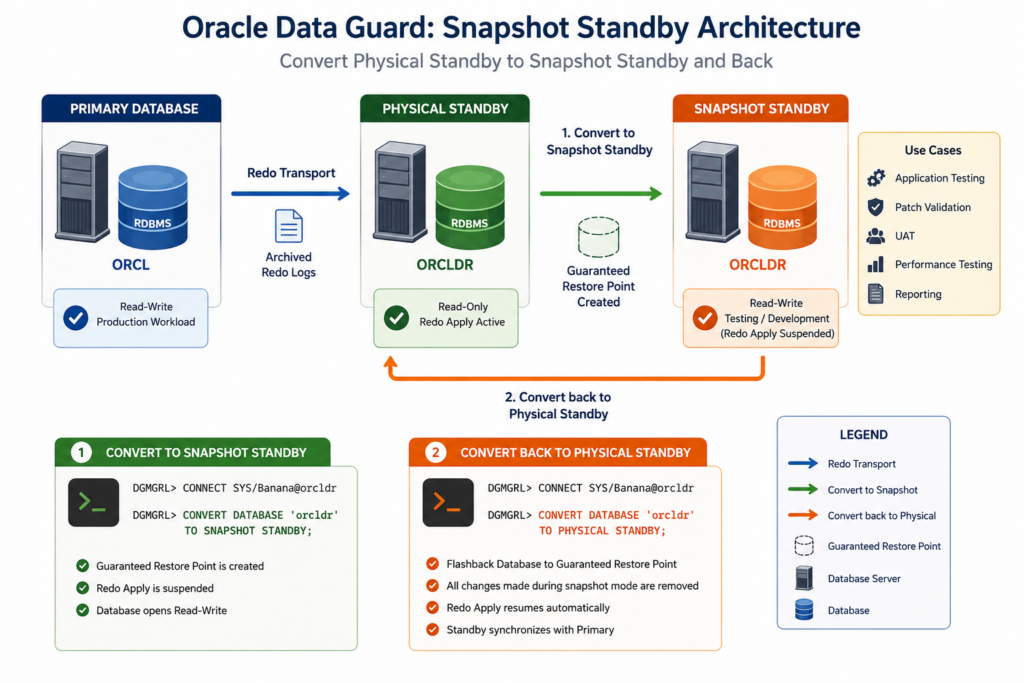
Prerequisites
Before converting:
- Data Guard Broker must be configured.
- Flashback Database must be enabled.
- The standby database should be synchronized with the primary.
- Broker configuration should show SUCCESS.
Verify:
DGMGRL> show configuration;Example:
Configuration - DGCONFIG

Protection Mode: MaxPerformance

Members:
orcl      - Primary database
orcldr    - Physical standby database

Fast-Start Failover: DISABLED

Configuration Status:
SUCCESS
Convert Physical Standby to Snapshot Standby
Log in to the standby using DGMGRL.
dgmgrl /Connect as SYS:
DGMGRL> CONNECT SYS/Banana@orcldrConvert the standby:
DGMGRL> CONVERT DATABASE 'orcldr' TO SNAPSHOT STANDBY;Broker output:
Converting database "orcldr" to a Snapshot Standby database...
Operation succeeded.
The standby is now:
- Read-write
- Open for testing
- No redo apply
Verify:
DGMGRL> SHOW DATABASE 'orcldr';You’ll see:
Role: SNAPSHOT STANDBYPerform Your Testing
At this point you can:
- Create tables
- Modify data
- Install application patches
- Run performance tests
- Execute batch jobs
- Validate upgrades
Example:
CREATE TABLE TEST_TABLE AS
SELECT * FROM DBA_USERS;

INSERT INTO TEST_TABLE VALUES (...);

COMMIT;
All these changes exist only on the Snapshot Standby.
Convert Snapshot Standby Back to Physical Standby
Once testing is complete:
Start DGMGRL.
dgmgrl /Connect:
DGMGRL> CONNECT SYS/Banana@orcldrRun:
DGMGRL> CONVERT DATABASE 'orcldr' TO PHYSICAL STANDBY;Broker output:
Converting database "orcldr" to a Physical Standby database...
Operation succeeded.
Oracle now:
- Uses Flashback Database.
- Removes every local change made during Snapshot mode.
- Restores the original standby state.
- Applies all accumulated redo.
- Synchronizes with the primary.
Verify the Role
Check:
DGMGRL> SHOW DATABASE 'orcldr';Expected:
Role: PHYSICAL STANDBYAlso verify redo apply:
DGMGRL> SHOW DATABASE VERBOSE 'orcldr';Look for:
- Apply State: APPLY-ON
- Transport Lag: 0
- Apply Lag: 0
Best Practices
- Ensure Flashback Database is enabled before conversion.
- Keep the Snapshot Standby period as short as practical to minimize redo backlog.
- Verify sufficient Fast Recovery Area (FRA) space before converting.
- Confirm the broker configuration is healthy (
SUCCESS) before and after the conversion. - Monitor redo apply after converting back to ensure the standby catches up with the primary.
Advantages of Snapshot Standby
| Feature | Benefit |
|---|---|
| Read-write database | Enables realistic testing |
| Production data | Test using current data |
| Automatic rollback | No manual cleanup required |
| No impact on primary | Production remains online |
| Easy conversion | Single DGMGRL command |
| Supports UAT | Safe application validation |
Summary
Oracle Data Guard Broker makes it remarkably simple to switch between a Physical Standby and a Snapshot Standby with just a single command. This feature is ideal for testing, patch validation, and development activities because it provides a temporary read-write environment while preserving the integrity of the standby database.
Once your work is complete, converting back to a Physical Standby automatically discards all temporary changes using Flashback Database and resumes redo apply, allowing the standby to quickly synchronize with the primary again.
If you’re managing Oracle Data Guard environments, Snapshot Standby is a powerful capability that lets you safely test changes without disrupting production or maintaining a separate testing environment.


