

Patching Oracle Grid Infrastructure is a routine yet critical task for every DBA. While Oracle provides the powerful OPatchAuto utility to simplify rolling and non-rolling patching, real-world environments don’t always behave as expected.
In this article, we’ll walk through a real OPatchAuto failure scenario in Oracle Grid Infrastructure 23c, analyze the root cause, and demonstrate how the issue was resolved using a simple but effective fix. If you’ve ever encountered the frustrating error:


Prerequisite check “CheckRollbackable” on auto-rollback patches failed
Environment Overview
Before diving into the issue, here’s a quick look at the environment used in this patching activity:
- Host: testdb
- Oracle Home:
/u01/app/grid - Grid Infrastructure Version: 23.0.0.0.0
- Patch Bundle: 38729625
- Patching Tool: OPatchAuto
The patch was applied using the following command:
/u01/app/grid/OPatch/opatchauto apply /home/oracle/patch/38729625 -oh /u01/app/grid -logLevel FINEST
Initial prerequisite checks and patch validation completed successfully. However, the problem surfaced during the binary patching phase.
The Problem: OPatchAuto Binary Patch Failure
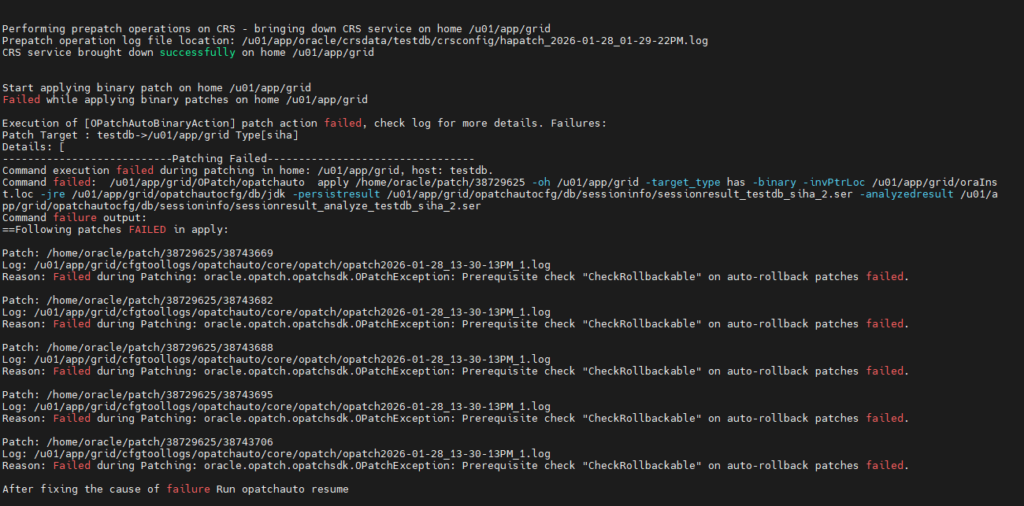
During the patch application, OPatchAuto failed with the following error:
Command execution failed during patching in home: /u01/app/grid, host: testdb.
Command failed:  /u01/app/grid/OPatch/opatchauto  apply /home/oracle/patch/38729625 -oh /u01/app/grid -target_type has -binary -invPtrLoc /u01/app/grid/oraInst.loc -jre /u01/app/grid/opatchautocfg/db/jdk -persistresult /u01/app/grid/opatchautocfg/db/sessioninfo/sessionresult_testdb_siha_2.ser -analyzedresult /u01/app/grid/opatchautocfg/db/sessioninfo/sessionresult_analyze_testdb_siha_2.ser
Command failure output:
==Following patches FAILED in apply:

Patch: /home/oracle/patch/38729625/38743669
Log: /u01/app/grid/cfgtoollogs/opatchauto/core/opatch/opatch2026-01-28_13-30-13PM_1.log
Reason: Failed during Patching: oracle.opatch.opatchsdk.OPatchException: Prerequisite check "CheckRollbackable" on auto-rollback patches failed.

Patch: /home/oracle/patch/38729625/38743682
Log: /u01/app/grid/cfgtoollogs/opatchauto/core/opatch/opatch2026-01-28_13-30-13PM_1.log
Reason: Failed during Patching: oracle.opatch.opatchsdk.OPatchException: Prerequisite check "CheckRollbackable" on auto-rollback patches failed.

Patch: /home/oracle/patch/38729625/38743688
Log: /u01/app/grid/cfgtoollogs/opatchauto/core/opatch/opatch2026-01-28_13-30-13PM_1.log
Reason: Failed during Patching: oracle.opatch.opatchsdk.OPatchException: Prerequisite check "CheckRollbackable" on auto-rollback patches failed.

Patch: /home/oracle/patch/38729625/38743695
Log: /u01/app/grid/cfgtoollogs/opatchauto/core/opatch/opatch2026-01-28_13-30-13PM_1.log
Reason: Failed during Patching: oracle.opatch.opatchsdk.OPatchException: Prerequisite check "CheckRollbackable" on auto-rollback patches failed.

Patch: /home/oracle/patch/38729625/38743706
Log: /u01/app/grid/cfgtoollogs/opatchauto/core/opatch/opatch2026-01-28_13-30-13PM_1.log
Reason: Failed during Patching: oracle.opatch.opatchsdk.OPatchException: Prerequisite check "CheckRollbackable" on auto-rollback patches failed.

After fixing the cause of failure Run opatchauto resume

]
OPATCHAUTO-68061: The orchestration engine failed.
OPATCHAUTO-68061: The orchestration engine failed with return code 1
OPATCHAUTO-68061: Check the log for more details.
OPatchAuto failed.

OPatchauto session completed at Wed Jan 28 13:31:19 2026
Time taken to complete the session 3 minutes, 35 seconds
As part of the failure summary, multiple sub-patches failed, including:
- 38743669
- 38743682
- 38743688
- 38743695
- 38743706
Each failure pointed to a similar issue — OPatch was unable to access or validate rollback-related files stored under the .patch_storage directory.
Key Error Symptoms in Logs
A deeper look into the OPatch logs revealed repeated messages like:
/u01/app/grid/cfgtoollogs/opatchauto/core/opatch/opatch2026-01-28_13-30-13PM_1.log.patch_storage directory does not exist or is not readableCannot copy file from 'README.txt'OPatch cannot find cached file under .patch_storage
Example log snippet:
OPatch/jre does not exist. Adding /u01/app/grid/jdk/bin/java to oop dependency list
[Jan 28, 2026 1:31:17 PM] [INFO]    OPatch cannot find cached file under /u01/app/grid/.patch_storage/38743682_Jan_17_2026_11_49_04/unchanged_files.txt:
[Jan 28, 2026 1:31:17 PM] [INFO]    Patch 38743682:
                                    Copy Action: Directory "/u01/app/grid/.patch_storage/38743682_Jan_17_2026_11_49_04" does not exist or is not readable.
                                    'oracle.micronaut, 3.8.5.3.0': Cannot copy file from 'README.txt' to '/u01/app/grid/micronaut/patch/README.txt'
[Jan 28, 2026 1:31:17 PM] [INFO]    OPatch cannot find cached file under /u01/app/grid/.patch_storage/38743695_Jan_17_2026_11_49_50/unchanged_files.txt:
[Jan 28, 2026 1:31:17 PM] [INFO]    Patch 38743695:
                                    Copy Action: Directory "/u01/app/grid/.patch_storage/38743695_Jan_17_2026_11_49_50" does not exist or is not readable.
                                    'oracle.rhp.crs, 23.0.0.0.0': Cannot copy file from 'README.txt' to '/u01/app/grid/rhp/patch/README.txt'
[Jan 28, 2026 1:31:17 PM] [INFO]    OPatch cannot find cached file under /u01/app/grid/.patch_storage/38743706_Jan_17_2026_11_48_45/unchanged_files.txt:
[Jan 28, 2026 1:31:17 PM] [INFO]    Patch 38743706:
                                    Copy Action: Directory "/u01/app/grid/.patch_storage/38743706_Jan_17_2026_11_48_45" does not exist or is not readable.
                                    'oracle.usm, 23.0.0.0.0': Cannot copy file from 'README.txt' to '/u01/app/grid/lib/README.txt'
[Jan 28, 2026 1:31:17 PM] [INFO]    OPatch cannot find cached file under /u01/app/grid/.patch_storage/38743688_Jan_17_2026_11_49_55/unchanged_files.txt:
[Jan 28, 2026 1:31:17 PM] [INFO]    Patch 38743688:
                                    Copy Action: Directory "/u01/app/grid/.patch_storage/38743688_Jan_17_2026_11_49_55" does not exist or is not readable.
                                    'oracle.has.common, 23.0.0.0.0': Cannot copy file from 'README.txt' to '/u01/app/grid/srvm/admin/README.txt'
[Jan 28, 2026 1:31:17 PM] [INFO]    Prerequisite check "CheckRollbackable" on auto-rollback patches failed.
                                    The details are:

                                    Patch 38743682:
These errors clearly indicated that OPatchAuto expected certain rollback metadata directories to exist—but they were missing.
Understanding the Root Cause
OPatchAuto performs rollbackability checks before applying patches. This ensures that if something goes wrong, Oracle can safely roll back the changes.
In this case:
- The Grid home already contained references to previous patch metadata
- Required subdirectories under
.patch_storagewere missing - As a result, the CheckRollbackable prerequisite failed
This situation can occur due to:
- Manual cleanup of
.patch_storage - Incomplete patch rollback in the past
- Filesystem or permission inconsistencies
- Migration or cloning of Oracle homes
The Solution: Recreate Missing .patch_storage Directories
Fortunately, the fix was straightforward.
Based on the error messages, the missing directories were manually recreated under the Grid home. The following commands were executed as the oracle user:
mkdir -p /u01/app/grid/.patch_storage/38743682_Jan_17_2026_11_49_04
mkdir -p /u01/app/grid/.patch_storage/38743695_Jan_17_2026_11_49_50
mkdir -p /u01/app/grid/.patch_storage/38743706_Jan_17_2026_11_48_45
mkdir -p /u01/app/grid/.patch_storage/38743688_Jan_17_2026_11_49_55
No files needed to be copied manually—OPatchAuto only required the directories to exist so it could proceed with its rollback validation logic.
Resuming the Patch with OPatchAuto
Once the directories were created, the patching process was resumed using:
/u01/app/grid/OPatch/opatchauto resume
OPatchAuto successfully detected the existing session and continued from where it had failed.
What Happened Next?
- Binary patching completed successfully
rootadd_rdbms.shexecuted without errors- CRS services were restarted
- Post-patch operations completed normally
[root@testdb 38729625]# /u01/app/grid/OPatch/opatchauto resume
Session log file is /u01/app/grid/cfgtoollogs/opatchauto/opatchauto2026-01-28_01-43-41PM.log
Resuming existing session with id SA3K

Start applying binary patch on home /u01/app/grid
Binary patch applied successfully on home /u01/app/grid


Running rootadd_rdbms.sh on home /u01/app/grid
Successfully executed rootadd_rdbms.sh on home /u01/app/grid


Performing postpatch operations on CRS - starting CRS service on home /u01/app/grid
Postpatch operation log file location: /u01/app/oracle/crsdata/testdb/crsconfig/hapatch_2026-01-28_01-50-50PM.log
CRS service started successfully on home /u01/app/grid

OPatchAuto successful.

--------------------------------Summary--------------------------------

Patching is completed successfully. Please find the summary as follows:

Host:testdb
SIHA Home:/u01/app/grid
Version:23.0.0.0.0
Summary:

==Following patches were SUCCESSFULLY applied:

Patch: /home/oracle/patch/38729625/38743669
Log: /u01/app/grid/cfgtoollogs/opatchauto/core/opatch/opatch2026-01-28_13-44-12PM_1.log

Patch: /home/oracle/patch/38729625/38743682
Log: /u01/app/grid/cfgtoollogs/opatchauto/core/opatch/opatch2026-01-28_13-44-12PM_1.log

Patch: /home/oracle/patch/38729625/38743688
Log: /u01/app/grid/cfgtoollogs/opatchauto/core/opatch/opatch2026-01-28_13-44-12PM_1.log

Patch: /home/oracle/patch/38729625/38743695
Log: /u01/app/grid/cfgtoollogs/opatchauto/core/opatch/opatch2026-01-28_13-44-12PM_1.log

Patch: /home/oracle/patch/38729625/38743706
Log: /u01/app/grid/cfgtoollogs/opatchauto/core/opatch/opatch2026-01-28_13-44-12PM_1.log


OPatchauto session completed at Wed Jan 28 13:52:04 2026
Time taken to complete the session 8 minutes, 26 seconds
Successful Patch Summary
At the end of the process, OPatchAuto reported a clean success:
- SIHA Home:
/u01/app/grid - Version: 23.0.0.0.0
- Status: Patching completed successfully
All sub-patches under bundle 38729625 were applied without further issues.
Lessons Learned & Best Practices
This issue highlights several important takeaways for Oracle DBAs:
1. Never Ignore .patch_storage
The .patch_storage directory is critical for OPatch rollback operations. Avoid manual cleanup unless explicitly recommended by Oracle Support.
2. Always Check Logs Carefully
OPatchAuto error messages can look intimidating, but they often point directly to the root cause if you read them closely.
3. Use opatchauto resume
There’s no need to re-run the entire patch. OPatchAuto’s resume feature is reliable and saves time.
4. Validate Permissions
Ensure the Oracle user has proper read/write access to the Grid home and its subdirectories.
Conclusion
OPatchAuto failures can be stressful—especially when CRS is down and production timelines are tight. However, as this scenario demonstrates, even critical-sounding errors like CheckRollbackable failures can have simple, non-invasive solutions.
By recreating missing .patch_storage directories and resuming the patch, Oracle Grid Infrastructure 23c was successfully patched without rollback, reinstallation, or downtime extension.
If you’re managing Oracle 19c or 23c environments, understanding OPatchAuto internals like this can save you hours of troubleshooting.
Happy patching 🚀
If you found this useful, feel free to share it with your fellow DBAs.


